
COI tracking software
COI tracking software that reads every certificate for you
Upload a certificate of insurance, snap a photo of it, or let it arrive by email. LapseHawk reads the insurer, policies, limits and dates, checks them against the requirements you set, and warns you before coverage lapses.
7-day free trial · every feature · no card needed
How it works
From certificate to compliance status in one step
1. The COI comes in
Upload a PDF or a phone photo, or connect Gmail, Outlook, Google Drive or OneDrive and LapseHawk picks up certificates from the folder you choose.
2. LapseHawk reads it
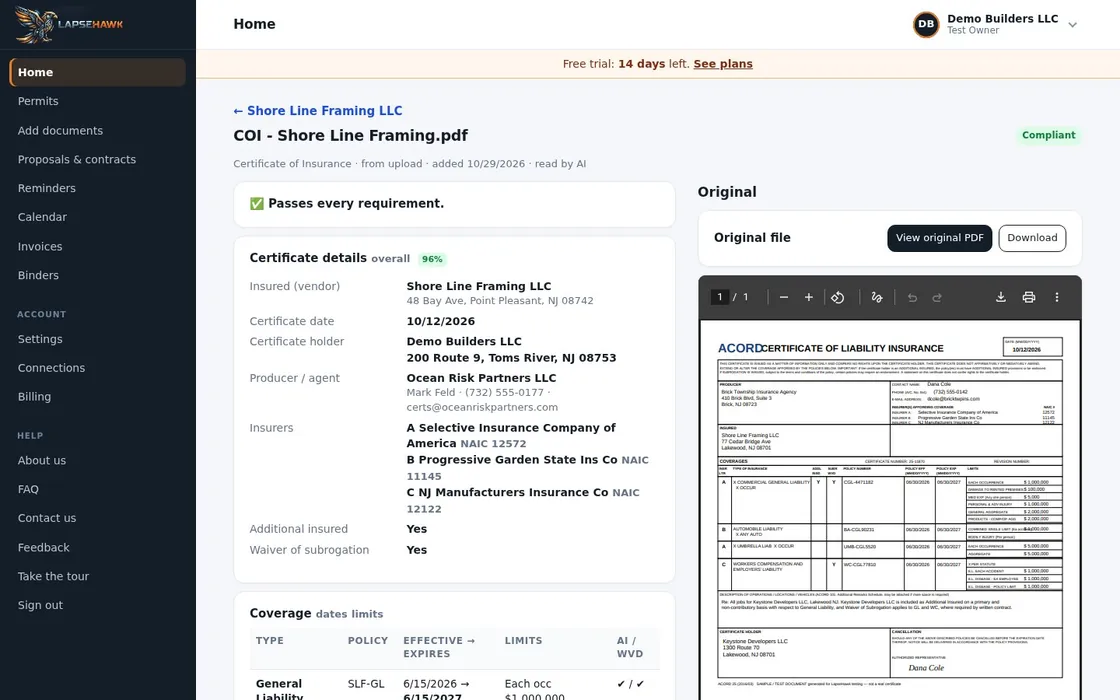
It pulls out the insurer, policy numbers, coverage types, limits, and effective and expiration dates, and files the certificate under the right vendor.
3. It checks your rules
Each certificate is compared with the limits you require. Low limits, missing coverage and expired policies are flagged.
4. You get warned early
Expiring certificates show on the dashboard and calendar, with reminders 30, 14 and 7 days before by default. You choose the days.
What you see
Every vendor's insurance status at a glance
Each vendor gets one clear status, colour-coded on the dashboard:
- Insurance compliant: every required coverage is there and current
- Expiring: a policy ends soon
- Expired: a policy has ended
- Below limits: a limit is lower than you require
- Insurance incomplete: something you require is missing from the certificate
- Missing insurance: no certificate on file yet
Beyond the certificate
The rest of the vendor file, in the same place
W-9s and licenses
W-9s, licenses and other vendor documents are read and filed under the same vendor, with history kept.
Follow-up emails
When a certificate needs fixing, LapseHawk drafts the email to the vendor for you to review and send.
By project
On construction projects you can see each vendor's COI status on the project page, worst first.
Bills and invoices too
Bills and invoices from the same vendor are read and filed next to their insurance, so you can see who you're paying.
FAQ
Questions people ask
Does LapseHawk read ACORD 25 certificates?
Yes. It reads ACORD 25 certificates and other certificate layouts, as PDFs or phone photos. You can open any certificate and check what was read against the original.
Can I set different insurance requirements?
Yes. You set your required limits once for the account, and you can make an exception for a specific vendor when a job needs one.
Will it warn me before a certificate of insurance expires?
Yes. LapseHawk shows what's expiring on the dashboard and calendar, sends reminders 30, 14 and 7 days before by default (you can change them), and drafts the follow-up email to the vendor.
How much does it cost?
$19.99 per user per month or $199 per user per year, and every plan has every feature. Unlimited is $9,500 per year for your whole company. Start with a 7-day free trial, no card needed.
More answers on the FAQ page. Prices are on the Pricing page.
Nothing lapses.
Made by property managers and construction contractors, for property managers and contractors. Less paperwork. More building.
No card needed to start.